Dispatch board software gives your office one screen that shows every unassigned job and every engineer's day, so scheduling becomes a drag and a drop instead of a round of phone calls. Fisem's dispatch board has day, week and month views, an unassigned jobs queue beside the board, SLA status on every job, and a warning when two bookings overlap. The dispatcher still makes every decision; the board makes it fast and visible.
Key points
- Drag a job from the unassigned queue onto an engineer's row to schedule it, with an Undo if you drop it in the wrong place.
- Assignment is per job, so one work order can be shared between engineers and each job can be reassigned on its own.
- Every job shows its SLA status, priority and type, with planned maintenance in blue and reactive work in red.
- Overlapping bookings for one engineer trigger a warning, not a block, so the dispatcher stays in control.
- Fisem does not choose the engineer, optimise routes or check holidays. It is a fast, clear board, not an auto-scheduler.
The problem: the morning the board stops matching reality
Picture a small, fictional commercial refrigeration firm with six engineers. At 07:45 the office has some jobs planned, new reactive calls from overnight, and one planned visit needing an F-Gas certified engineer. The dispatcher works from a whiteboard, a spreadsheet and a phone.
By 08:15 an engineer has called to say a job is running long, and a second job has arrived with a tight response window. Someone moves a magnet on the whiteboard but not the spreadsheet, and the engineer given the urgent call is not told, because the dispatcher is on the phone.
The information lives in too many places. Every change means updating three things, and any one of them can be missed. It is worse when one work order covers several assets: the board has a single line for the visit, so it goes to one person or gets split in someone's head and nowhere else.
What it costs when scheduling lives in several places
The costs are qualitative, and we put no figures on them.
Jobs slip through the gaps. A job that is not visibly unassigned can sit unassigned while its SLA clock runs.
Engineers act on out-of-date instructions. If the board and the person in the van disagree, the engineer phones the office or goes to the wrong job.
Double-booking goes unseen. On a whiteboard two overlapping bookings look like any other two magnets, and the clash is usually found by the engineer.
What good dispatch board software does
Whatever product you choose, these are the things worth looking for.
- Shows unassigned work next to the schedule. The queue and the engineers' days belong on the same screen.
- Makes scheduling a direct action. With drag and drop scheduling the board is where you assign work, and mistakes are easy to undo.
- Shows urgency on the job itself. SLA status, priority and job type should be visible on each block, from the same clock the rest of the system uses.
- Handles shared work orders. Real visits often involve several assets, so each job should be assignable separately while still showing which belong together.
- Warns without taking over. It should flag overlaps and let the dispatcher decide.
How Fisem handles it
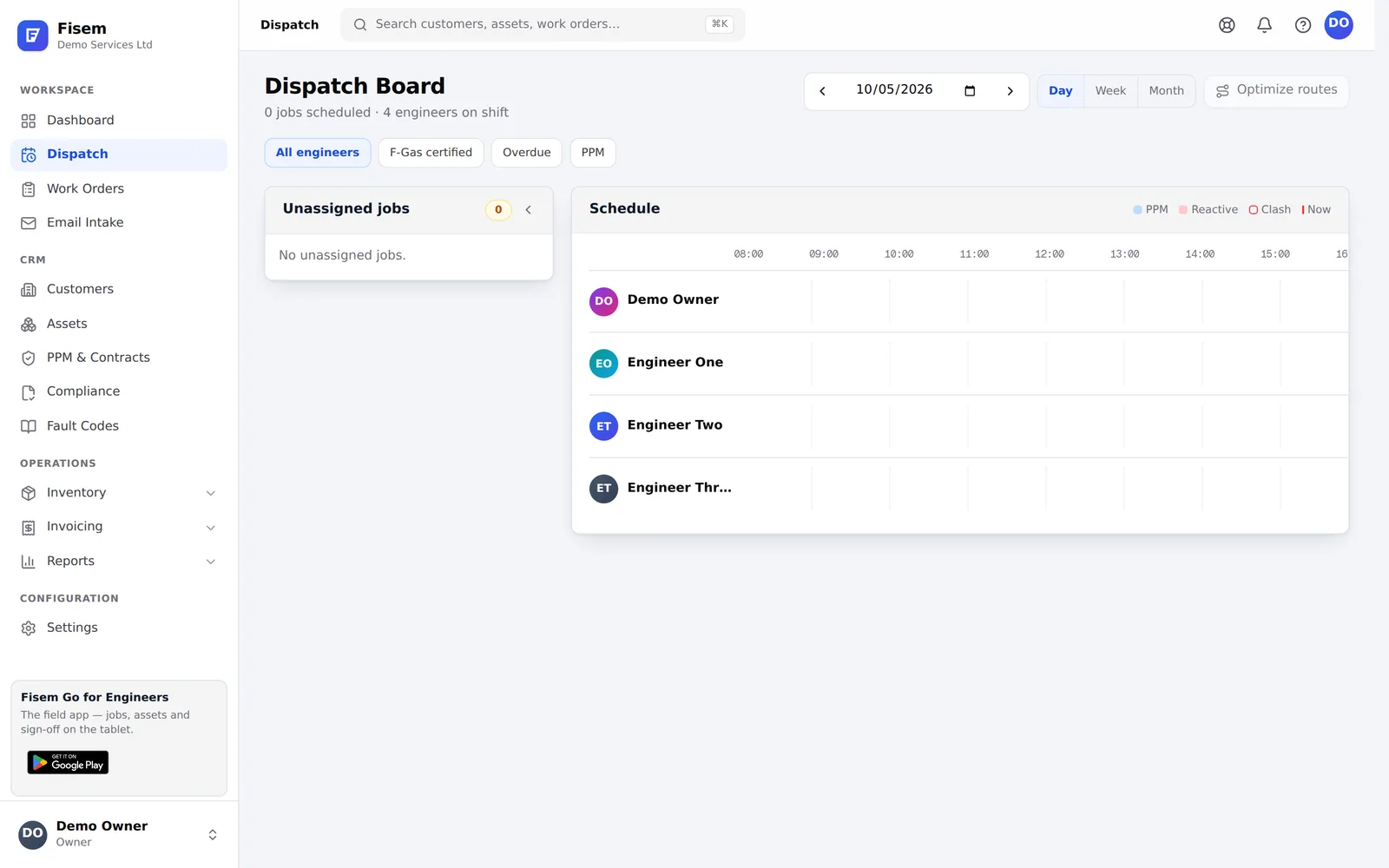
Three views, one board. Switch between day, week and month views and step through dates. In day view each engineer has a row on a timeline from 08:00 to 18:00. Jobs snap to 15-minute steps, and a new booking defaults to one hour. Drag a block to move it to another time or another engineer, and drag its edge to resize it. The shortest a job can be is 15 minutes.
An unassigned jobs queue beside the board. Drag a job from the queue onto an engineer's row and it is scheduled. A short confirmation, "Job scheduled.", appears with an Undo that sends the job straight back to the queue. In week view you can drag from the queue or move a booking between engineer and day cells, with the same Undo. In month view a job dropped on a day opens a small picker where you choose the engineer and time, because a month cell cannot infer them.
Assignment is per job. A work order can contain several jobs, one per asset, and each can go to a different engineer or the same one. While a work order has more than one job in the queue, those jobs share a coloured left-border tint so you can see they belong to one visit. Every block shows the work order number and the asset. Later, the office can reassign a single job from the work order's Jobs tab without touching the others.
Urgency you can read at a glance. Each job shows its SLA status from the same SLA clock used everywhere else in Fisem: the time left, "Overdue", or "Flexible" when there is no SLA due time. Priority badges show High, Medium or Low. Planned maintenance jobs are blue and reactive jobs are red. When the office marks a scheduled appointment as en route, the block turns amber and pulses, and the board header counts how many jobs are scheduled and how many are en route.
Filters for the questions you ask most. Choose all engineers, F-Gas certified (which shows only engineers marked as F-Gas certified, each carrying an F-Gas badge on their row), Overdue, or PPM.
A warning when bookings overlap. If two bookings for the same engineer overlap, the board shows a visual warning. It is a warning and not a hard block, because only the dispatcher knows whether the overlap is a mistake.
Assignment that carries through. When a job is assigned, its status moves from New to Assigned and the engineer receives a push notification on the Fisem mobile app. The notification is best-effort, and a failed notification never undoes the assignment. If the job is a planned maintenance contract visit, scheduling it on the board also marks the visit as booked on the contract, with the date and engineer.
Sending a job back. A job can be returned to unassigned, but only before work on it has started. Only users with permission to assign can drag and schedule.
What Fisem does not do
Fisem does not automatically pick the engineer for you. It does not match jobs to engineers by skills beyond the F-Gas filter. It does not optimise routes or travel time, and it does not check engineers' holidays or availability before you drop a job onto their row.
All of that remains the dispatcher's judgement. The board makes the decision quick, puts the relevant facts on screen, and records the result so everyone sees the same thing.
Where to start
You do not need to change how you dispatch to try this.
- Run one day alongside your current method. Compare the board with the whiteboard at the end of the day.
- Start with the queue. Make sure every new job lands in the unassigned queue.
- Check which engineers are marked as F-Gas certified so the F-Gas filter shows the right people.
- Try a shared work order. Split a multi-asset visit across two engineers.
- Agree who can assign. Only users with permission to assign can schedule.
Start your 30-day free trial and set up Fisem for your trade in minutes, or see what else it covers on the features overview.
Frequently asked questions
What is dispatch board software?
Dispatch board software gives the office a single view of unassigned jobs and each engineer's schedule. The dispatcher moves jobs onto engineers and times, and the system records the assignment and tells the engineer. It replaces the whiteboard, spreadsheet or phone calls many trade firms still use.
Can a whiteboard or spreadsheet do the same job?
For a very small team, often yes. The trouble starts when jobs carry SLA deadlines, several engineers share one work order, or someone other than the dispatcher needs to know what is planned. A board connected to your job records stays current without anyone retyping it.
Can one work order be split between engineers in Fisem?
Yes. Assignment is per job, and a work order can hold several jobs, one per asset. Each job can go to a different engineer or the same one, and the office can reassign a single job from the work order's Jobs tab without touching the others.
Does Fisem stop double-booking?
Fisem warns you. If two bookings for the same engineer overlap, the board shows a visual warning, but it does not block the booking. The dispatcher decides whether the overlap is a mistake or intended.
Does Fisem pick the engineer automatically?
No. Fisem does not auto-assign, optimise routes or check holidays before a drop. The dispatcher chooses the engineer, and the board makes that choice quick and visible. The F-Gas filter is the only skills filter.
Run the whole visit in one system
Fisem schedules the engineer, carries the job sheet offline, captures the evidence, issues the certificate and raises the invoice. Set up for your trade in minutes, no card needed.