Every UK engineering firm that looks after other people's equipment has the same quiet worry: somewhere in the customer base, an inspection is about to lapse and nobody has noticed. Compliance calendar software exists to remove that worry. It keeps every statutory inspection, service and certificate in one place, each with a next due date, so the question "what is due?" has an answer that does not depend on anyone's memory.
Key points
- A compliance calendar records, per asset and per requirement, when the work was last done and when it is next due.
- Intervals differ by regime: some are fixed, some are set by the inspector, so one blanket reminder does not work.
- Overdue items should be visible without anyone opening a particular asset first.
- Fisem builds this from asset categories, recalculates it from the certificates you log, and lists what is overdue or due within 30 days.
- This article is general guidance, not legal advice.
The problem: statutory dates live in too many places
Consider an illustrative site, "Greenfield". It has gas boilers, a passenger lift, a fixed electrical installation and a fire alarm. Each asset carries its own regime, and each regime has its own rhythm:
- Gas. Landlords must have gas appliances checked annually under the Gas Safety (Installation and Use) Regulations 1998.
- Lifting equipment. The Lifting Operations and Lifting Equipment Regulations 1998 (LOLER) require thorough examination, commonly every 6 months for equipment that lifts people and every 12 months for other lifting equipment.
- Electrical. An EICR under BS 7671 is not on one fixed cycle. The recommended interval for the next inspection is set by the inspector and depends on the type of premises; for privately rented homes in England, the Electrical Safety Standards Regulations 2020 set a maximum of five years.
- Fire detection. BS 5839-1 covers servicing of fire detection and alarm systems, typically on a six-monthly cycle.
Put those across fifty customers and the dates sit in diaries, inboxes, certificate PDFs and one engineer's head.
What it costs when one slips
A missed date rarely arrives as a single problem. It tends to arrive as several smaller ones:
- A customer asks for a current certificate and the honest answer is "we will need to check".
- The inspection that was due last month is now squeezed into this week, at the expense of planned work.
- A lapse on a legally required inspection becomes a conversation with the customer, and potentially with their insurer or an enforcing authority.
- Admin time goes on chasing dates by hand instead of on billable work.
We are deliberately not putting a figure on any of this, because it varies too much by trade and customer. The pattern is what matters: the cost of a lapse is almost always larger than the cost of tracking.
What good compliance calendar software does
Whatever tool you use, a workable system does five things:
- One row per asset per requirement. A rollup showing only an asset's earliest date hides which requirement is actually due.
- Next dates calculated, not typed. Where the interval is fixed, the next due date follows from the last one.
- Inspector-set intervals respected. Where the certificate states the next date, that date is what is tracked.
- Overdue visible by default. The list of problems should be a screen you open, not a search you run.
- Evidence attached. Each date points to the certificate that proves it.
How Fisem handles it
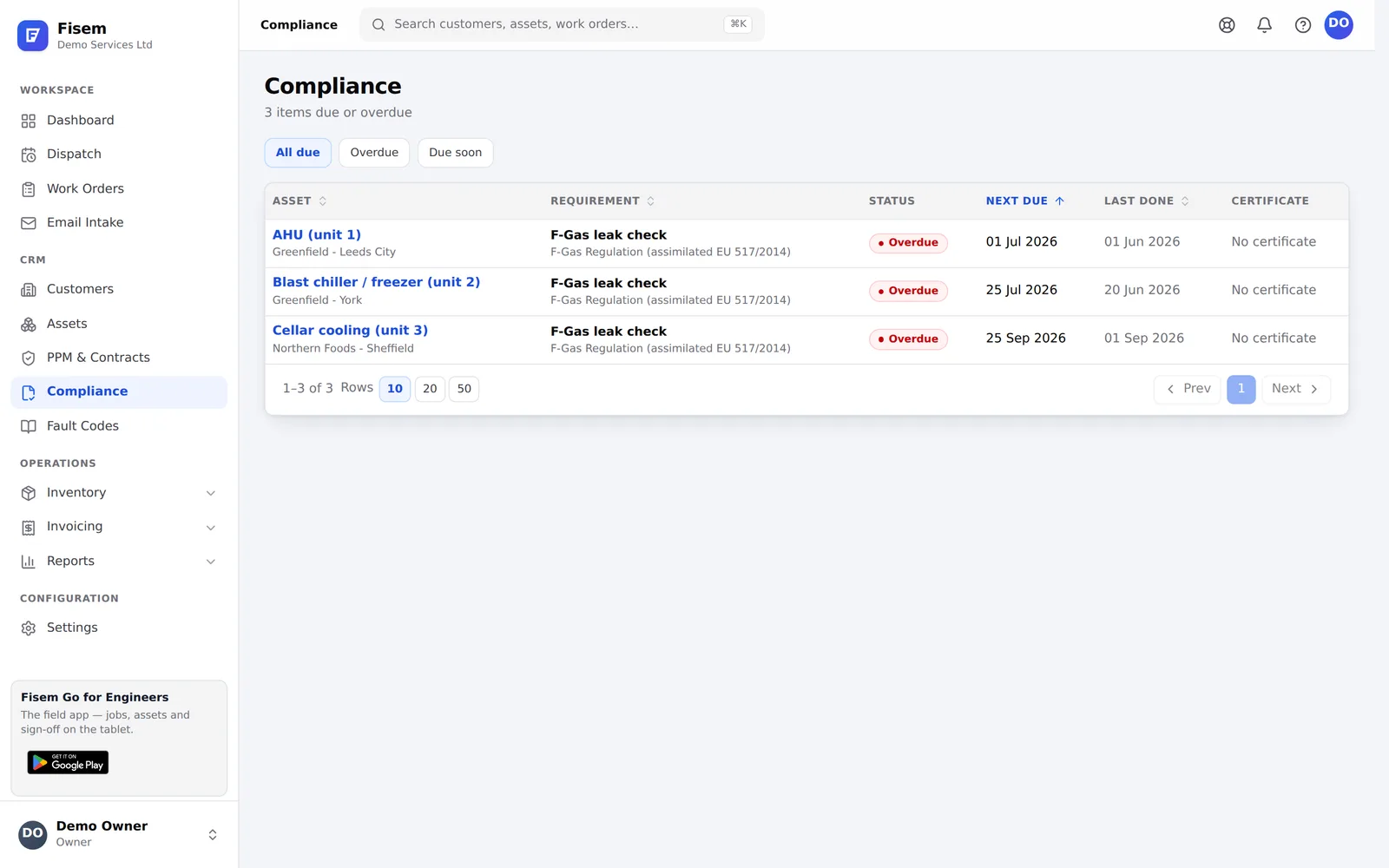
It starts from the asset. When you add an asset and give it a category and type, Fisem creates a schedule row for each compliance requirement that applies to that category. You do not build the calendar by hand.
Fixed intervals are calculated. For requirements with a fixed number of months, such as the annual gas safety record, Fisem works out the next due date from the last certificate, or from the asset's install date if nothing has been logged yet. For lifting equipment, the LOLER thorough examination is set to 6 months when the asset is marked as lifting persons, and to 12 months otherwise.
Inspector-set intervals come from the certificate. Requirements such as an EICR or a written scheme of examination do not have one fixed interval. Fisem starts those as "manual" and takes the next due date from the certificate you log, so the date reflects the inspector's decision rather than a guess.
Logging a certificate updates the calendar. The schedule is recalculated from the certificates on file, so the order you enter them in does not matter. A certificate logged by mistake can be voided with a reason. It is kept on record but stops counting, and the schedule recalculates from what remains. Deleting a certificate is not possible.
One screen shows what needs attention. The Compliance screen lists every item that is overdue or due within the next 30 days. Each row shows the asset and site, the requirement and its standard, a status badge (Overdue or Due soon), the next due and last done dates, and the latest certificate on file with its number and expiry. You can filter to overdue or due soon and sort by asset, requirement or date. The same list appears as a Compliance Due card on the dashboard.
Status is worked out from the date. Fisem derives Overdue and Due soon from the due date each time the list is read, so an item whose date has passed appears even if nobody has touched it since.
Reminders and customer visibility. A nightly job raises an email reminder for the account owner when a logged certificate is within 30 days of its expiry date, once per certificate. Customers who use the portal can see counts of items in date, due soon and overdue for their own assets.
What Fisem does not do
Fisem tracks dates and evidence. It does not decide which regulations apply to a customer's premises or whether an inspection outcome is acceptable. Those are judgements for a competent person. The Compliance screen is also a due-date list sorted by date, not a month-grid diary view.
Where to start
Pick one customer with a mix of assets and set them up with a category and install date each. You will see the due and overdue list populate straight away, and you can log existing certificates to bring the dates up to date. From there, adding the rest of your customer base is repetition, not design.
Start your 30-day free trial and set up Fisem for your trade in minutes, or see what else it covers on the features overview.
Frequently asked questions
What is a compliance calendar?
A compliance calendar is a single record of every statutory inspection, test, service and certificate renewal that a set of assets needs, each with its last-done date and next due date. For a UK engineering firm it covers the assets you look after for customers, not just your own premises.
What is statutory inspection scheduling?
Statutory inspection scheduling is planning the examinations and checks that legislation or a recognised standard requires, such as an annual landlord gas safety check or a LOLER thorough examination, so each one is booked before its due date rather than after it has lapsed.
Can a spreadsheet work as a compliance calendar?
It can for a handful of assets, but it relies on someone remembering to update and check it. Once dates differ per asset and per requirement, a spreadsheet does not recalculate when a certificate is issued, does not flag overdue items on its own and keeps no evidence trail.
Does Fisem set the inspection intervals for me?
For requirements with a fixed interval, such as a 12-month gas safety check or a LOLER examination, Fisem calculates the next due date from the last certificate or the asset's install date. Where the interval is set by an inspector or a written scheme, such as an EICR, the date comes from the certificate you log. Fisem is not legal advice, so confirm intervals with a competent person.
How far ahead does Fisem flag a due inspection?
Fisem's compliance screen lists anything overdue plus anything due within the next 30 days. A nightly job also raises an email reminder for the account owner when a logged certificate is within 30 days of its expiry date.
Run the whole visit in one system
Fisem schedules the engineer, carries the job sheet offline, captures the evidence, issues the certificate and raises the invoice. Set up for your trade in minutes, no card needed.